Updated October 2026.
Phishing is still the most common way attackers get into a business. The e-mail looks real: a supplier, a bank, a delivery company, or your own CEO. It asks you to click a link, open an attachment or make a payment. The motive is almost always money, either directly or by stealing a password that leads to money later.
What has changed since we first wrote about this in 2020 is the quality. AI tools now write phishing e-mails with perfect spelling and grammar, in any language, tailored to your company and your role. The old advice to “look for bad English” no longer works. This post explains how phishing works today and what actually protects you.
People, process and technology
We always look at security problems in three parts: people (what your team knows and does), process (the rules you follow, especially for money and access) and technology (the tools that block and detect attacks). Phishing is aimed at people, so you need all three working together: technology catches most phishing e-mails, people catch what gets through, and process stops a single mistake from turning into a loss.
How attackers do it
- A link to a fake login page. “Your mailbox is full”, “a document has been shared with you”, “your password expires today”. The page looks exactly like Microsoft 365, Google or your bank, and whatever you type goes to the attacker. Newer phishing kits also capture your login session, so they can get in even when you use multi-factor authentication.
- A QR code instead of a link. E-mail filters check links, but not always images, so attackers put the link in a QR code and ask you to scan it with your phone, which is usually less protected.
- A harmful attachment. An invoice, a purchase order or a CV that installs malware when opened, often a ZIP, HTML or PDF file, or an Office document that asks you to “enable content”.
- A spoofed or lookalike sender. The display name says your CFO or your supplier, but the address is different: a free webmail account, or a domain one letter off from the real one.
- “Call us back”. No link at all, just a fake bill or subscription renewal with a phone number, where someone talks you into installing remote-access software or paying.
Who they pretend to be
- Suppliers and vendors, with an invoice or new bank details.
- Banks and payment services, with a “suspicious transaction” or KYC update.
- Senior people such as the CEO, CFO, a branch manager or a finance manager, with an urgent and confidential request.
- Well-known services: Microsoft, Google, DocuSign, courier companies, and tax departments.
A real case
Here is an incident from our own work, with names removed. A finance employee received an e-mail with the subject “RE: REQUEST”. It showed the name of a senior person at a vendor and read: “I need you to make an outstanding payment for me. I’ll send you the info and instructions for you to process it. You will be refunded as soon as possible.”
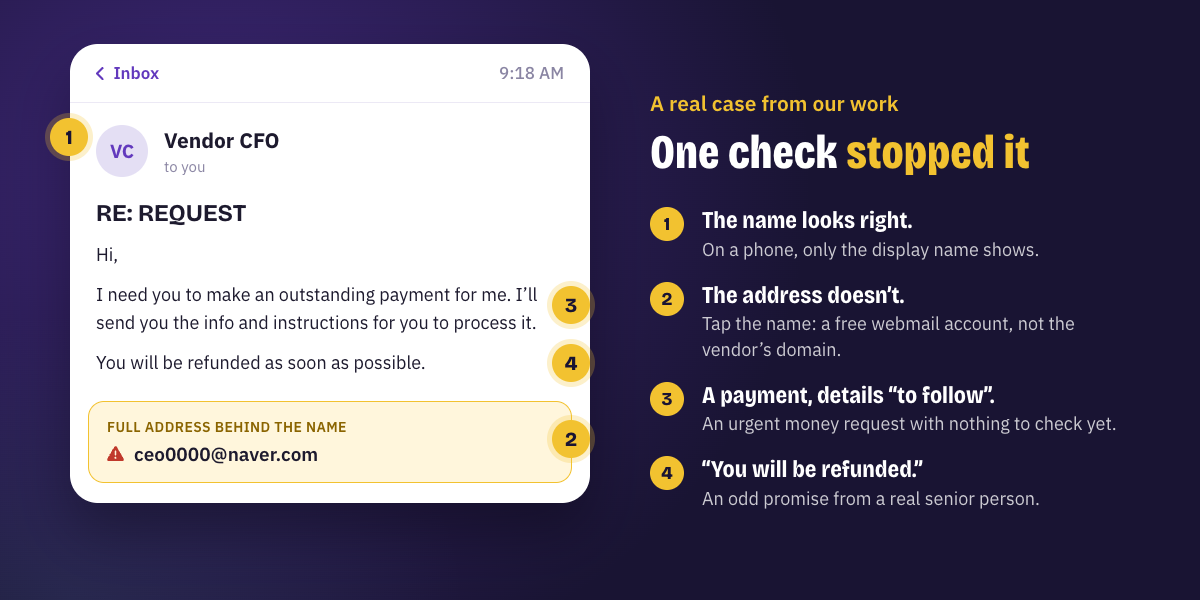
On a phone, only the name was visible, and it looked genuine. But the employee was careful: they tapped the name to see the full address, and it was a free webmail account, not the vendor’s company domain. They didn’t reply, reported it, and nothing was lost. One habit, checking the full address, stopped the attack. Requests like this are the start of the most expensive kind of e-mail fraud; our post on fake invoice e-mails explains how it plays out.
How to spot a phishing e-mail
- It creates urgency or fear: “today”, “final notice”, “your account will be closed”.
- It asks for something unusual: a payment, a password, gift cards, or to keep it confidential.
- The sender’s full address doesn’t match the name or the company.
- A link’s real destination (hover over it on a computer, press and hold on a phone) is not the site it claims to be.
- You weren’t expecting the attachment, or it asks you to enable content or enter a password to open it.
How to stay safe
People
- Train your team, briefly and often. Ten minutes every quarter, with real examples and practice e-mails, works better than one long session a year.
- Check the full address, not just the name, before replying to any important customer, supplier or senior person.
- Verify through another channel. If an e-mail asks for money or a password, call the person on a number you already have.
Process
- Make reporting easy and safe. A “Report phishing” button or one known address, and thanks for every report, even false alarms.
- Protect payments. Changes of bank details and urgent payments always need a call-back and a second approver.
Technology
- E-mail filtering for spam, phishing and malware, with the protection features of Microsoft 365 or Google Workspace turned on.
- Multi-factor authentication on every account, ideally an authenticator app or passkeys, which phishing can’t easily steal.
- Up-to-date antivirus or endpoint protection on every computer used for work, including personal ones.
- SPF, DKIM and DMARC on your domain, and an “external sender” tag on e-mails from outside the company.
Our Microsoft 365 security checklist shows where to switch most of these on.
If someone clicked
- Don’t panic, and don’t hide it. Report it straight away; minutes matter.
- If a password was entered, change it from a different device and sign out all sessions.
- If an attachment was opened, disconnect the computer from the network and call IT.
- If a payment was made, call the bank immediately. In India, also call the cybercrime helpline on 1930.
For anything bigger, our post on the first 60 minutes after a cyber attack has a one-page plan.
How CATEYE can help
We run phishing awareness sessions for teams in India and the US, set up e-mail protection, and test how your people and systems respond. Our cybersecurity services cover IT security strategy, VAPT and security audits. Talk to us about protecting your team.